CleanCutAudio

Professional Audio Trimming and DSP Tool

CleanCutAudio is a fast and intuitive audio‑cleaning tool designed for creators, podcasters, and video makers. With a single click, it removes background noise, enhances voice clarity, and normalizes volume, delivering clean and professional‑sounding audio in seconds.
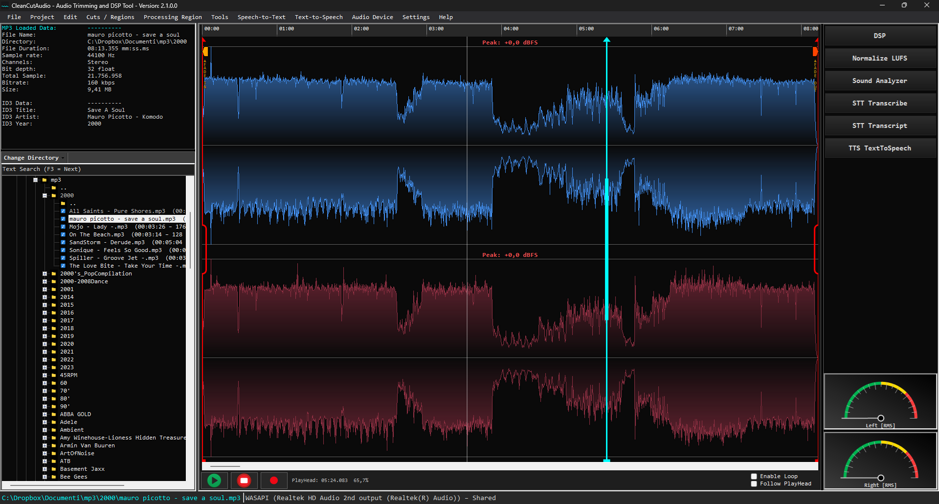
cca_1.4_main.jpeg

The DSP panel gives users full control over the audio‑processing chain, offering a set of essential tools such as LUFS normalization, soft clipping, compression, fade‑in/out, and a built‑in equalizer. Each module can be enabled individually, and the processing order is fully customizable, allowing creators to build the exact signal chain they need for their workflow.
 

cleancutaudio_dsp.jpegcleancutaudio_analyzer.jpeg

🚀 CleanCutAudio 1.1 – New Features
🎙️ 48 kHz Recorder
High‑quality audio recording at 48 kHz for professional‑grade clarity.
Improved stability, lower latency, and more accurate signal capture.
 

cca_recorder.jpeg

🚀 CleanCutAudio 1.2 – Workflow, Playback & Editing Upgrades


🔊 True Stereo Export (Independent L/R Channels)
✂️ Cut, Copy, Paste
A complete editing workflow with fast, precise, and responsive cut/copy/paste operations.
➕ Insert Silence (Between Markers)
Instantly replaces the selected region with silence — ideal for removing breaths, gaps, or unwanted noise.
🔁 Loop Playback (with Centered Loop Icon)
🎧 Audio Scrubbing (Playhead Drag Playback)
Dragging the playhead now produces realtime audio feedback.
🎚️ Realtime DSP Refresh (Even During Loop Playback)
 

📝 NEW: Offline Speech‑to‑Text Transcription (Vosk Engine)
CleanCutAudio now includes a fully offline speech‑to‑text engine powered by Vosk.
Features include:
- Accurate transcription of voice recordings without internet connection
- Word‑level timestamps for precise navigation
- Automatic transcript panel with synchronized text
- One‑click transcript export
- Perfect for podcasts, interviews, voiceovers, and spoken‑word editing
- Ultra‑fast processing with progress bar and cancellation support
 

cca_transcript1.jpeg

🚀 CleanCutAudio 1.3.0.0 — Release Notes
New Features & Improvements
🎧 True Stereo Widener
A real Haas‑style stereo widener has been implemented. It is applied after independent left/right processing during export, delivering a wider and more natural stereo image.
🗑️ Delete in the TreeView
✏️ Rename in the TreeView

🕒 Time Display in hh:mm:ss Format
Time is now displayed in hours:minutes:seconds, ideal for long recordings and precise editing workflows.
🎨 Improved Full‑Waveform Rendering with Smart Downsampling
🔍 Double‑Click on Overview → Zoom to Full Waveform
Timeline & Navigation Enhancements
🧭 Optimized Timeline for MP3 Files Longer Than 1 Hour
The LUFS pipeline is now cleaner, simpler, and fully preset‑driven.
🏷️ Preset Name in LUFS Panel
The LUFS panel now displays the active preset name, improving clarity and workflow transparency.

Editing Enhancements
✂️ SnapBothMarkersToZeroCrossing
Both markers can now snap to the nearest zero‑crossing, ensuring clean, click‑free cuts.
📌 Select Whole File (Ctrl+A)
Selecting the entire file automatically zooms out to show the full waveform.
▶️ PlayHead → MarkerStart
A new command moves the playhead directly to the start of the selected marker for faster navigation.
🔎 Fine Zoom with Arrow Keys
Arrow keys now support precise zoom adjustments for detailed editing.
↔️ Fine Pan with Arrow Keys
Arrow keys also allow fine horizontal panning, keeping the playhead and markers perfectly synchronized.


CleanCutAudio is crafted for creators who demand speed, clarity, and professional results without the complexity of traditional audio tools. Whether you're polishing a podcast, enhancing voiceovers, or preparing content for your audience, CleanCutAudio gives you studio‑quality sound with effortless simplicity. 

This is audio cleanup reimagined — fast, intuitive, and built to elevate every project you create.